
What Is Vector Format?
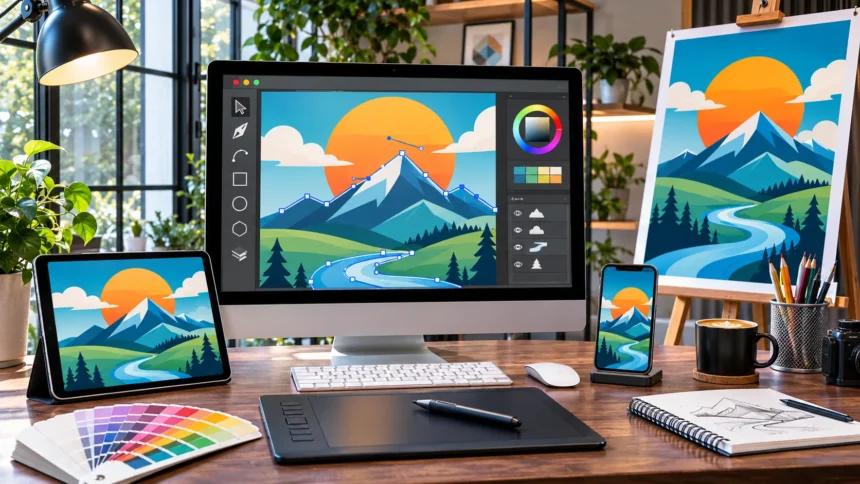
Vector format is a type of digital image format that uses mathematical formulas, points, lines, and curves to create graphics. Unlike traditional pixel-based images, vector graphics can be resized without losing their original quality. This makes them particularly useful for creating logos, illustrations, icons, diagrams, and other visual designs that require sharp and consistent details.
A vector image consists of paths that define the position, shape, size, and appearance of different graphic elements. These paths allow design software to calculate how an image should appear at various dimensions. Whether displayed on a small mobile screen or printed on a large billboard, vector graphics can maintain their clarity and visual structure.
Graphic designers, web developers, illustrators, and printing professionals frequently use vector file formats because of their flexibility. These files make it easier to modify individual design elements without recreating the entire image. Understanding vector format helps individuals choose suitable image types for different creative projects, professional applications, and digital publishing requirements.
How Does Vector Format Work?
Vector graphics work by representing images through mathematical instructions instead of storing individual colored pixels. These instructions define the coordinates, curves, outlines, colors, and other properties of each graphical element. When an image is opened or displayed, compatible software interprets these instructions and renders the visual elements according to the required dimensions.
Each vector graphic contains paths that connect different points within a coordinate system. Designers can adjust these points to change the shape, direction, or appearance of specific elements. Mathematical curves, commonly known as Bézier curves, allow designers to create smooth outlines and detailed illustrations without relying on a fixed number of pixels.
When a vector image is resized, the software recalculates its mathematical properties to match the new dimensions. This process allows the graphic to remain sharp without introducing the pixelation often associated with enlarged raster images. However, the final display quality can still depend on the rendering software, screen resolution, and export settings.
Vector Format vs. Raster Format
Vector and raster formats represent two different approaches to creating and storing digital images. Vector graphics use mathematical paths, while raster images consist of individual pixels arranged within a grid. Each format has unique characteristics that make it suitable for particular design requirements, image types, editing processes, and professional applications.
Raster formats such as JPEG, PNG, and GIF are commonly used for photographs and images containing complex color variations. These images have a fixed pixel resolution, which means excessive enlargement can make them appear blurry or pixelated. Vector graphics, however, can be resized across different dimensions while preserving the clarity of their mathematical shapes.
Choosing between vector and raster formats depends on the intended purpose of an image. Vector graphics are generally better suited for logos, typography, illustrations, and technical drawings. Raster images are usually more appropriate for photographs, realistic textures, and complex visual effects where individual pixel information is necessary to represent detailed color transitions.
Common Types of Vector File Formats
Scalable Vector Graphics, commonly known as SVG, is a widely used vector format for websites and digital applications. SVG files use XML-based instructions to describe graphical elements, including shapes, paths, colors, and text. Their scalability and compatibility with modern web browsers make them particularly useful for website icons, logos, and interactive illustrations.
Encapsulated PostScript, or EPS, is another established file format commonly associated with professional graphic design and printing. Adobe Illustrator’s AI format is also widely used for creating and maintaining editable vector artwork. These formats support detailed design elements and are commonly exchanged between designers, printing companies, and other creative professionals.
Portable Document Format, commonly called PDF, can also contain vector graphics alongside text and raster images. Similarly, some technical design applications use formats such as DXF to store geometric drawings. Understanding the capabilities of different vector file extensions helps users select the most appropriate format based on compatibility, editing needs, and project requirements.
Key Features of Vector Graphics
Scalability is one of the most important features of vector graphics because it allows images to maintain their clarity at different sizes. Designers can enlarge or reduce graphical elements without permanently affecting their mathematical structure. This flexibility makes vector files useful for projects that require consistent visual quality across multiple display and printing dimensions.
Editability is another important characteristic of vector graphics that helps simplify the design process. Individual shapes, lines, colors, and other elements can often be modified independently within compatible editing software. Designers can make adjustments to specific objects without affecting unrelated areas of the artwork, depending on how the original file is structured.
Vector graphics can also support features such as transparency, gradients, layers, and reusable design components, depending on the selected format. These capabilities allow designers to create flexible artwork that can be adapted for different applications. Maintaining an editable vector source file makes future design updates more convenient and reduces unnecessary duplication of creative work.
Benefits of Using Vector Format
One of the biggest benefits of using vector format is maintaining consistent image quality across different sizes. A company can use the same vector logo for business cards, websites, packaging, and large advertising banners. This scalability helps organizations maintain a recognizable visual identity without creating separate original designs for every application or display size.
Vector files can also be relatively small when they contain simple shapes and illustrations. Instead of storing information for every individual pixel, these files describe graphical elements through mathematical instructions. However, highly complex vector artwork may require more storage space, particularly when it includes numerous paths, effects, embedded photographs, or detailed design components.
Another advantage is the flexibility vector graphics provide during editing and customization. Designers can modify colors, adjust shapes, reposition elements, and update visual compositions using compatible software. These capabilities make vector artwork especially valuable for projects that require regular revisions, multiple design variations, or consistent branding across different marketing materials and communication channels.
Where Are Vector Graphics Commonly Used?
Logo design and brand development are among the most common applications of vector graphics. Businesses require visual identities that remain recognizable across digital platforms, printed materials, and physical products. Vector logos allow designers to maintain consistent shapes, proportions, and colors when adapting brand assets to different marketing requirements and presentation formats.
Web designers and developers also use vector graphics to create icons, interface elements, illustrations, and responsive visual components. SVG files are particularly useful because they can adapt to different screen sizes and resolutions. This flexibility helps maintain clear graphics across smartphones, tablets, laptops, and desktop computers without requiring separate image versions for every device.
Vector graphics are widely used in technical drawings, educational diagrams, maps, infographics, and product illustrations. These applications often require precise lines, accurate shapes, and clear visual details that remain consistent when resized. Printing professionals also use vector artwork for signage, packaging, promotional materials, and other projects that require clean outlines and scalable designs.
Why Vector Format Matters for Web Design and SEO
Vector graphics can improve the visual experience of websites by providing sharp images across different screen resolutions. Unlike fixed-resolution graphics, SVG icons and illustrations can adapt to various device dimensions without requiring multiple image sizes. This capability supports responsive web design and helps websites maintain consistent visual quality for mobile and desktop visitors.
Simple SVG graphics may also contribute to faster website loading because their mathematical structure can require less storage than equivalent high-resolution raster images. However, actual performance depends on the complexity of the artwork and how the file is optimized. Reducing unnecessary code, effects, and embedded resources can help improve the efficiency of vector-based web graphics.
From an SEO perspective, optimized graphics can support website performance, accessibility, and overall user experience, although vector format itself does not guarantee higher search rankings. Developers should provide appropriate alternative text for meaningful images and ensure graphics remain accessible. Combining efficient image formats with good technical SEO practices can support a more effective website.
Why Vector Files Are Important for Printing
Professional printing often requires graphics that remain sharp across different physical dimensions and production methods. Vector files are useful because their mathematical structure allows artwork to be resized without losing detail. This makes them suitable for producing business cards, brochures, posters, product labels, exhibition displays, and large outdoor advertising materials.
Printing companies frequently request vector logos and illustrations because these files make it easier to prepare artwork for production. Designers can adjust dimensions, modify colors, and create precise outlines according to specific printing requirements. However, suitable color settings, font handling, and document preparation remain important for achieving accurate and consistent printed results.
Vector artwork is also useful for production processes such as vinyl cutting, engraving, and certain types of product decoration. These processes may require clearly defined paths that equipment can interpret as shapes or boundaries. Providing properly prepared vector files helps reduce production difficulties and supports consistent visual results across different materials and printing methods.
How to Create and Edit Vector Images
Creating vector images typically involves using graphic design software that supports mathematical paths, shapes, and editable objects. Applications such as Adobe Illustrator, CorelDRAW, and Inkscape provide tools for developing vector artwork. Designers can begin with basic geometric shapes or create custom illustrations using drawing tools, control points, and adjustable curves.
The design process often involves combining different elements, applying colors, adjusting outlines, and organizing objects into logical groups or layers. Designers can modify individual components throughout the project without permanently affecting the entire composition. Saving the original artwork in an editable vector format allows future adjustments to be made more efficiently when project requirements change.
Once a vector design is complete, it can be exported into different file formats depending on its intended application. SVG may be suitable for websites, while an appropriately prepared PDF or EPS file may be requested for printing. Designers should review export settings carefully to ensure the required visual properties, fonts, and graphical elements are preserved.
How to Convert Raster Images Into Vector Format
Converting a raster image into vector format generally involves a process known as image tracing or vectorization. This technique identifies shapes, edges, and color regions within a pixel-based image and attempts to recreate them as mathematical paths. It is commonly used when converting simple logos, symbols, sketches, and illustrations into scalable digital artwork.
Many graphic design applications include automatic tracing features that can generate vector paths from existing raster images. The quality of the conversion depends on factors such as image resolution, visual complexity, color variation, and the selected tracing settings. Simple images with clear boundaries typically produce more accurate results than detailed photographs containing numerous textures and gradual color transitions.
Manual tracing is another approach that allows designers to recreate graphical elements with greater control over their shapes and details. Although this method requires additional time, it can produce cleaner and more editable artwork for professional projects. Simply saving a raster image with a vector file extension does not automatically convert its pixels into mathematical paths.
Limitations of Vector Graphics
Although vector graphics provide excellent scalability, they are not always suitable for representing realistic photographs. Photographic images contain complex textures, shadows, reflections, and subtle color variations that can be difficult to recreate using mathematical paths. Attempting to vectorize highly detailed photographs may result in complicated files or artwork that looks noticeably different from the original image.
Software compatibility can also create challenges when sharing vector files between different applications and operating systems. Certain formats may contain specialized effects, fonts, or editing features that are not fully supported by other programs. These differences can affect how artwork appears when opened, edited, or exported using software other than the application in which it was created.
Complex vector illustrations may also require significant processing power when they contain thousands of individual paths or graphical effects. In some cases, a raster version may be more efficient for displaying detailed artwork. Understanding these limitations helps designers choose suitable file formats instead of assuming that vector graphics are always the best solution for every visual project.
Conclusion
Vector format provides a flexible approach to creating digital graphics through mathematical paths, shapes, and coordinates. Its ability to maintain image quality across different dimensions makes it particularly valuable for logos, illustrations, technical drawings, and professional printing. Editable vector files also simplify design modifications and help maintain consistent visual quality across multiple applications.
Different vector file formats provide specific advantages depending on the intended purpose of the artwork. SVG is commonly used for web graphics, while AI, EPS, and suitable PDF files are frequently associated with professional design and printing. Understanding the differences between these formats helps users make informed decisions about compatibility, scalability, and editing requirements.
Although vector graphics provide numerous benefits, raster images remain essential for photographs and other highly detailed visual content. Choosing the right image format depends on the nature of the project and its technical requirements. By understanding how vector format works, individuals and businesses can create more flexible, efficient, and professional visual materials.
FAQs
What is vector format in simple words?
Vector format is a digital image format that uses mathematical paths, lines, and shapes instead of pixels. It allows graphics to be resized without losing their original clarity or quality.
Is a PNG file a vector image?
No, PNG is a raster image format that stores graphics using pixels. Although PNG supports transparency, enlarging the image beyond its original resolution can reduce its visual quality.
What are the most common vector file formats?
Common vector file formats include SVG, AI, EPS, and DXF. PDF files can also contain vector graphics, although they may include raster images and other document elements.
Is vector format better than JPEG?
Vector format is generally better for scalable logos, icons, and illustrations. JPEG is usually more suitable for photographs and detailed images containing complex textures and natural color variations.
Can I convert a JPEG into vector format?
Yes, JPEG images can be converted into vector artwork through automatic image tracing or manual recreation. The conversion quality depends on image resolution, complexity, and the vectorization method used.