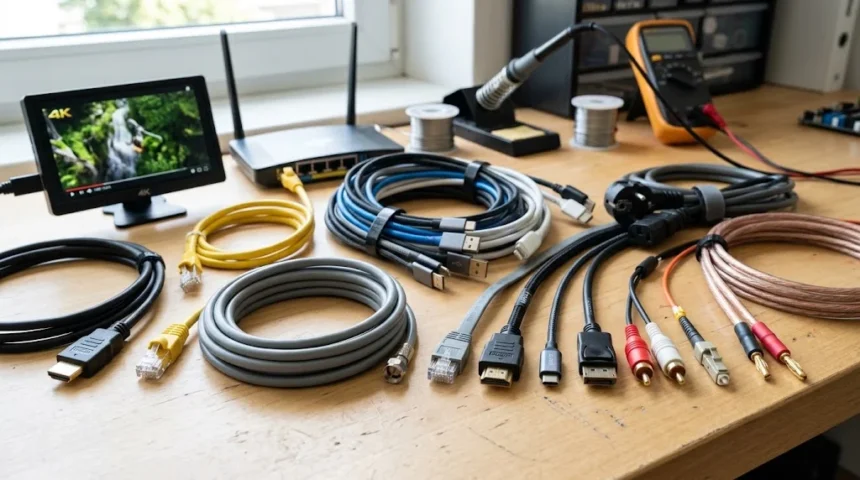
Cables are everywhere, even though most people rarely think about them until they need to connect a device, replace a damaged wire, or install new equipment. Homes, offices, data centers, vehicles, factories, entertainment systems, and communication networks all rely on different types of cables to carry electricity, digital data, audio, video, or control signals. Choosing the wrong cable can reduce performance, create compatibility problems, or introduce unnecessary safety risks. Choosing the right one, however, can make a system faster, more reliable, and easier to maintain. Understanding cable types does not require becoming an electrical engineer. Once you know what each cable is designed to carry and where it is commonly used, the differences become much easier to understand.
The most common categories include electrical power cables, Ethernet cables, fiber optic cables, coaxial cables, USB cables, HDMI cables, audio cables, automotive wiring, and industrial control cables. Some are designed primarily for power transmission, while others specialize in transferring information at very high speeds. Cable construction can also differ significantly, with variations in conductor material, insulation, shielding, connector type, bandwidth, voltage rating, and environmental protection. These differences explain why a cable suitable for charging a phone may be completely inappropriate for powering equipment or connecting a network switch. This guide explains the major types of cables, their uses, key differences, and practical examples. It will also help you recognize which cable is appropriate for common home, business, networking, and industrial applications.
What Are Cables and Why Do Different Types Exist?
A cable is generally made from one or more conductors surrounded by protective materials that allow electricity or signals to travel between two points. Copper is one of the most widely used conductor materials because it conducts electricity efficiently and can be shaped into flexible wires. Aluminum is also used in certain electrical applications because it is lighter and often more economical. Fiber optic cables work differently because they carry information using light rather than electrical current. Around the conductor or fiber, manufacturers add insulation, shielding, jackets, and sometimes strength members to protect the cable. The exact construction depends on what the cable must carry and the environment in which it will operate.
Different cable types exist because power, data, sound, video, and control signals have very different technical requirements. A high-voltage electrical cable must safely carry substantial current without overheating, while an Ethernet cable must preserve digital signals and reduce electromagnetic interference. HDMI cables need enough bandwidth to carry high-resolution video and multichannel audio, while microphone cables prioritize clean analog audio transmission. Fiber optic systems require materials capable of guiding light over long distances with minimal signal loss. No single cable design can perform all these tasks equally well. Engineers therefore optimize cable construction for a specific combination of voltage, current, frequency, bandwidth, distance, flexibility, durability, and cost.
Cable conductors may be solid or stranded, and the difference affects how the cable behaves in real-world use. A solid conductor consists of a single metal core and is commonly used in permanent installations because it provides stable electrical characteristics. Stranded conductors contain many smaller wires twisted together, making the cable more flexible and better suited to applications involving movement. Patch cables, extension cords, appliance leads, and portable equipment commonly benefit from stranded construction. However, flexibility can sometimes come with slightly different resistance or termination characteristics compared with solid conductors. Understanding this distinction is useful when installing network wiring, electrical systems, audio equipment, or machinery. The right conductor construction depends largely on whether the cable will remain fixed or move regularly.
Insulation and cable jackets are equally important because conductors must be separated from people, other wires, moisture, and potentially damaging environments. Common insulation materials include PVC, polyethylene, rubber compounds, fluoropolymers, and specialized heat-resistant materials. Cable jackets may be designed to resist sunlight, oil, chemicals, abrasion, fire, water, or extreme temperatures. Indoor cables generally face different conditions from underground, outdoor, marine, or industrial cables. Some installations also require low-smoke or flame-resistant materials to meet building or safety requirements. This is why two cables with similar-looking conductors may have very different ratings. The outer materials determine where a cable can be installed safely and how long it is likely to perform reliably.
Connectors are another major difference between cable types because they determine how equipment physically interfaces with the cable. Ethernet commonly uses modular network connectors, HDMI uses specialized digital video connectors, and USB is available in several connector designs such as Type-A and Type-C. Coaxial cables may use connectors such as F-type or BNC depending on the application. Electrical cables may terminate in plugs, terminals, breakers, distribution equipment, or fixed wiring points instead of removable connectors. A cable can have excellent internal construction yet still be unsuitable if its connector does not match the equipment. Therefore, identifying a cable requires considering both its internal design and the connector attached to each end.
Electrical Power Cables and Their Common Uses
Electrical power cables are designed to transfer electrical energy from a source to appliances, machinery, lighting systems, outlets, distribution panels, or other equipment. Their construction depends heavily on voltage, current, installation location, and required safety protection. Household wiring generally operates under very different conditions from the cables used in industrial plants, power grids, or underground distribution systems. A typical electrical cable may include live conductors, neutral conductors, grounding conductors, insulation, fillers, and an outer protective jacket. Cable size is important because conductors must be large enough to carry current without excessive heat buildup. Using undersized electrical wiring can increase voltage drop and create potentially dangerous operating conditions.
Flexible power cords are commonly found on televisions, computers, kitchen appliances, lamps, chargers, and portable tools. These cables usually contain stranded copper conductors because flexibility is important when devices are moved, unplugged, or repositioned. The external jacket provides protection against everyday bending, abrasion, and contact. Different appliances require different conductor sizes depending on how much current they draw. A low-power electronic device may need only a relatively small cable, while heaters and heavy appliances require more substantial wiring. Plugs and connectors also vary by region and equipment type. When replacing a power cord, matching the required voltage, current capacity, connector, grounding arrangement, and certification is more important than simply choosing one that physically fits.
Building wiring cables are typically installed permanently inside walls, ceilings, floors, conduits, or electrical distribution systems. Depending on local electrical practices, these cables may contain individual insulated conductors or multiple conductors enclosed within a common sheath. They distribute electricity from the main electrical panel to outlets, lights, switches, air-conditioning equipment, and fixed appliances. Permanent wiring usually requires stronger attention to building codes, conductor sizing, grounding, fire performance, and installation methods. Cables installed inside walls must also be protected from nails, moisture, excessive heat, and mechanical damage. Because electrical mistakes can create serious hazards, fixed wiring should follow applicable standards and be handled by appropriately qualified professionals when required.
Armored cable is designed for installations where additional mechanical protection is necessary. Its construction commonly includes insulated conductors surrounded by a metallic armor layer and an outer protective sheath. The armor helps protect the internal conductors from crushing, impact, abrasion, and other physical damage. Armored power cables may be used in factories, commercial facilities, outdoor systems, underground installations, and other environments where ordinary wiring would be vulnerable. Different armor designs are available depending on flexibility, environmental exposure, and electrical requirements. Although armored cable provides extra protection, it still needs to be installed correctly. The cable’s voltage rating, conductor size, grounding method, bending limits, and environmental classification all remain important.
High-voltage power cables are used to transmit and distribute electricity across utilities, substations, industrial systems, and large infrastructure projects. These cables require sophisticated insulation because the electrical stresses are far greater than those found in ordinary household circuits. They may contain conductor screens, insulation screens, metallic shielding, moisture barriers, armor, and heavy protective jackets. Some are installed underground, while others connect power equipment within substations or industrial complexes. Careful engineering is required because cable temperature, installation depth, conductor material, load, and surrounding environment can affect performance. High-voltage systems therefore illustrate how specialized cable design becomes as electrical requirements increase. They are very different from ordinary extension cords despite serving the same fundamental purpose of transferring electrical energy.
Network and Data Cables for Internet and Communication
Ethernet cables are among the most recognizable data cables because they connect computers, routers, switches, access points, security cameras, printers, and other network devices. Most modern Ethernet wiring uses twisted pairs of copper conductors that help reduce interference and maintain signal quality. Common categories include Cat5e, Cat6, Cat6a, and higher-performance variants designed for different speeds and frequencies. The category does not simply refer to physical appearance; it describes performance specifications that affect network capability. Choosing the right Ethernet cable depends on required bandwidth, transmission distance, installation environment, and future expansion plans. For many homes and offices, properly installed Ethernet continues to provide stable, low-latency connectivity alongside wireless networking.
Cat5e cable has been widely used for standard Gigabit Ethernet networks and remains common in existing installations. Cat6 provides improved performance characteristics and can support higher network speeds under suitable distance and installation conditions. Cat6a is designed to offer stronger performance for applications requiring higher bandwidth over longer structured-cabling runs. Higher categories also exist, but using the highest number available is not automatically necessary for every environment. Cable cost, connector compatibility, installation difficulty, and actual network equipment must all be considered. A fast cable cannot make a slow router or network switch operate beyond its capabilities. Network performance depends on the complete infrastructure rather than one component viewed in isolation.
Ethernet cables are also available in unshielded and shielded designs. Unshielded twisted pair cable is widely used because twisting the conductors naturally helps control interference in ordinary environments. Shielded Ethernet cables add conductive shielding around pairs, groups of pairs, or the entire cable to provide additional protection against electromagnetic interference. Shielding can be useful near industrial machinery, electrical equipment, power cables, or other strong sources of electrical noise. However, shielded systems need appropriate connectors, grounding, and installation practices to perform as intended. Installing shielding without understanding the complete system does not automatically improve network quality. Cable selection should therefore reflect the actual electromagnetic environment rather than the assumption that more shielding is always better.
Structured cabling has become increasingly important because modern businesses depend on reliable connections for phones, computers, access points, surveillance systems, cloud applications, and networked equipment. When a physical connection fails, support teams may need to determine whether the problem comes from the cable, connector, port, switch, device, or software configuration. This is where physical infrastructure management can connect naturally with modern IT workflows such as help desk automation, which can streamline support requests, recurring troubleshooting processes, and ticket routing. Clear cable labeling and organized patch panels make these systems much easier to support. Good networking is not only about speed. It is also about creating infrastructure that technicians can understand, troubleshoot, document, and maintain efficiently.
Patch cables are shorter Ethernet cables typically used to connect devices to wall outlets or network equipment inside racks. They are commonly made with stranded conductors because they need to remain flexible when equipment is moved or rearranged. Permanent horizontal cabling inside walls generally uses solid conductors and is terminated at wall jacks or patch panels. Mixing installation methods carelessly can reduce reliability because different cable designs are intended for different physical roles. Cable length also matters because Ethernet standards specify practical transmission limits for various applications. Excessively long, damaged, sharply bent, or poorly terminated network cables can introduce performance problems. Proper installation is therefore just as important as choosing the correct Ethernet category.
Audio and Video Cables for Entertainment and Media
HDMI cables are widely used to carry digital video and audio between televisions, monitors, game consoles, streaming devices, computers, projectors, and home theater equipment. Unlike older analog connections, HDMI can transmit high-resolution digital images and multichannel sound through a single cable. However, HDMI capabilities vary according to the equipment, cable specification, bandwidth requirements, and video format being used. Features such as higher resolutions, increased refresh rates, dynamic range formats, and advanced audio may demand greater cable bandwidth. A cable that works perfectly for basic video may not necessarily support more demanding display modes over every distance. Therefore, buyers should match cable capability to the actual source and display equipment rather than focusing only on branding.
DisplayPort is another digital interface frequently found on computers, monitors, graphics cards, and professional workstations. It is particularly common in desktop environments where high refresh rates, high resolutions, and multi-monitor configurations may be important. DisplayPort and HDMI can sometimes achieve similar tasks, but their feature sets and typical applications are not identical. Some devices support adapters between the two interfaces, although compatibility depends on the direction of conversion and equipment capabilities. USB-C connections can also carry DisplayPort video when the devices support the necessary alternate mode. This overlap can make modern display cables confusing at first. Checking the output capabilities of the source device and input specifications of the monitor is the safest approach.
Traditional analog audio cables remain common because many speakers, headphones, amplifiers, instruments, microphones, and professional sound systems continue to use electrical audio signals. The familiar 3.5 mm audio cable is often used for headphones, portable speakers, older computers, and auxiliary audio connections. Larger quarter-inch connectors are common in musical equipment, while RCA cables frequently appear in home audio and older video systems. Professional microphones commonly use balanced connections designed to reduce noise over longer cable runs. Connector appearance alone does not always reveal signal type because similar-looking plugs may be wired differently. Understanding whether a connection is balanced, unbalanced, mono, stereo, digital, or analog helps prevent compatibility problems.
XLR cables are strongly associated with microphones, mixing consoles, audio interfaces, stage equipment, and professional sound systems. A typical balanced XLR connection uses multiple conductors to help reject unwanted noise picked up along the cable. This makes it valuable where signals must travel across stages, studios, conference venues, or other electrically noisy environments. XLR connectors also provide a secure physical connection that is less likely to disconnect accidentally than many consumer plugs. However, the connector itself does not guarantee that every system using it operates identically. Signal level, impedance, equipment type, and wiring configuration still matter. Professional audio therefore depends on matching both the physical cable and the electrical characteristics of the connected devices.
Optical audio cables transmit digital sound using light and are commonly identified by interfaces such as TOSLINK. They are often used between televisions, soundbars, receivers, game systems, and other entertainment devices. Because the signal travels optically rather than as an electrical current through copper, optical cables are not affected by certain forms of electrical interference between connected equipment. However, they also have different bandwidth and format limitations compared with newer HDMI-based audio connections. The best option depends on the capabilities of the source and audio system. Optical cable remains useful for many installations, especially when equipment already supports it. Newer systems may instead use HDMI audio return features for greater integration and support for advanced formats.
USB and Device Connection Cables Explained
USB cables are among the most widely used cable types because they connect phones, computers, storage devices, cameras, keyboards, chargers, audio interfaces, accessories, and countless other electronics. USB is more complicated than it first appears because connector shape and data capability are separate concepts. A cable may use USB-A, USB-B, Micro-USB, Mini-USB, or USB-C connectors while supporting different transfer speeds and charging capabilities. Two cables that look almost identical may therefore perform very differently. One may support high-speed data and substantial charging power, while another may provide only basic charging or slower transfer rates. This is why choosing USB cables based solely on connector appearance can lead to disappointing performance.
USB-A is the familiar rectangular connector that has appeared on computers and chargers for many years. USB-B is larger and is commonly associated with printers, scanners, audio devices, and certain pieces of professional equipment. Micro-USB became especially common on older Android phones, portable electronics, power banks, and accessories before USB-C adoption expanded. Mini-USB appeared on some older cameras and devices but is now far less common. These connector changes reflect the evolution of portable technology and the need for smaller, more durable, or more capable interfaces. Older connectors remain relevant because millions of existing devices still use them. Keeping the appropriate cable can therefore extend the practical life of electronics that continue to work well.
USB-C has become increasingly important because its compact reversible connector can support charging, data transfer, video output, and other functions depending on the devices and cable. The connector’s shape does not guarantee that every capability is available. Some USB-C cables are intended mainly for charging, while others support faster data rates, higher charging power, or display connectivity. This distinction is one of the most common sources of consumer confusion. Plugging in successfully only confirms that the connector fits; it does not confirm that the cable supports every desired feature. When buying a USB-C cable for high-speed storage, displays, docking stations, or powerful laptops, check its actual technical capabilities rather than assuming all USB-C cables are interchangeable.
Charging cables must also be matched carefully to chargers and devices. Modern charging systems can negotiate different levels of power, but the cable must be capable of carrying the required current safely. A low-capacity cable can limit charging speed even when both the charger and device support faster charging. Poor-quality cables may also have weak connectors, inadequate conductors, or insufficient strain relief that causes premature failure. Cable length can influence convenience and electrical performance, especially in demanding charging applications. A very long cable may be comfortable to use from across a room but should still be appropriately designed for its expected load. Reliable construction matters more than choosing a cable purely because it is inexpensive.
Thunderbolt connections frequently use the USB-C connector shape on newer devices, which makes the relationship between the two technologies easy to misunderstand. Thunderbolt can support high-speed data, displays, docking stations, and other demanding peripherals when both connected devices and the cable support the required specification. A basic USB-C cable may physically connect to the same port without delivering identical capabilities. Cable markings and manufacturer specifications therefore become especially important in professional setups using external storage, multiple displays, or high-performance docking solutions. The broader lesson is that connector shape is only one part of cable identification. To understand what a cable can actually do, you also need to know its supported protocol, bandwidth, charging capacity, and intended application.
Fiber Optic and Coaxial Cables for High-Speed Communication
Fiber optic cable carries information using pulses of light traveling through extremely thin strands of glass or specialized plastic. This makes fiber fundamentally different from copper cables, which transmit electrical signals. Fiber can provide very high bandwidth over long distances while experiencing relatively low signal loss. It is also resistant to electromagnetic interference because the data is not carried as an electrical current through the fiber. These characteristics make fiber optic technology valuable for telecommunications, internet backbones, data centers, campuses, enterprise networks, and broadband connections. Fiber infrastructure has become increasingly important as homes and businesses demand faster connections. However, installation and termination require different tools, components, and handling techniques from traditional copper wiring.
Single-mode and multimode are two major categories of fiber optic cable. Single-mode fiber uses a very small core designed to carry light along a limited propagation path, making it highly suitable for long-distance and high-capacity communication. Multimode fiber has a larger core that allows multiple light paths and is commonly used for shorter connections within buildings, campuses, and data centers. Neither type is universally better because each is designed for different distances, equipment, wavelengths, and budgets. Transceivers and connectors must match the fiber being used. Installing expensive fiber without compatible network hardware will not create a functional connection. A successful fiber system depends on coordinating cable type, optics, connectors, distance, and transmission requirements.
Fiber optic cables also come in different physical constructions depending on their environment. Indoor fiber may prioritize flexibility and building fire requirements, while outdoor cable may include stronger jackets, water-blocking materials, or protection against sunlight. Armored fiber adds mechanical protection for areas where cables may face crushing, rodents, or other physical risks. Loose-tube constructions are often used where environmental protection and long outdoor runs are important, while tight-buffered designs are common in many indoor installations. Bend radius is particularly important because excessive bending can damage fiber or increase signal loss. Proper cable management therefore protects performance as well as physical integrity. Fiber should be routed carefully rather than treated exactly like ordinary copper wire.
Coaxial cable uses a central conductor surrounded by insulation, a conductive shield, and an external jacket. This concentric construction helps contain signals and protect them from interference. Coaxial cables have traditionally been used for cable television, broadband internet, antennas, radio systems, CCTV installations, satellite equipment, and other radio-frequency applications. Different coaxial cable types have specific impedance, attenuation, frequency, shielding, and connector characteristics. RG-6 is widely recognized in television and broadband environments, while other coax designs serve radio, laboratory, professional video, and telecommunications applications. Coaxial cable remains valuable despite the expansion of fiber and Ethernet because its electrical properties suit many specialized transmission systems.
Fiber and coaxial cable are sometimes compared because both may appear in telecommunications and broadband networks, but they function very differently. Fiber generally provides greater bandwidth potential and longer transmission distances without the same electrical interference concerns. Coaxial cable is mature, widely installed, comparatively straightforward to terminate, and well suited to many radio-frequency systems. Internet providers may use combinations of fiber and coax depending on their infrastructure architecture. Businesses may also use fiber for building backbones while Ethernet copper serves individual workstations. The correct choice depends on distance, bandwidth, equipment, cost, installation conditions, and future growth. Rather than asking which cable is universally best, it is more useful to ask which technology fits the specific communication problem.
Industrial, Automotive, and Specialty Cable Types
Industrial control cables connect sensors, switches, motors, controllers, automation systems, instruments, and machinery throughout manufacturing and processing environments. These cables may carry low-voltage control signals, data, measurement signals, or power depending on the application. Industrial environments can expose wiring to oil, chemicals, vibration, heat, electromagnetic interference, repeated movement, and mechanical stress. For that reason, industrial cables often use stronger jackets, additional shielding, specialized insulation, or reinforced construction. A cable that works perfectly in an office may deteriorate quickly beside production machinery. Industrial cable selection therefore requires attention to both electrical requirements and environmental exposure. Reliability matters because one damaged connection can interrupt an entire automated process.
Instrumentation cables are designed for applications where precise measurement and control signals must travel between field devices and control systems. They may connect temperature sensors, pressure transmitters, flow instruments, process equipment, and monitoring systems. Shielding is particularly important because small electrical signals can be vulnerable to interference from motors, power cables, variable-frequency drives, and heavy machinery. Twisted pairs and conductive screens help preserve signal integrity. Cable routing also matters because even a well-shielded cable can experience problems if installed carelessly beside powerful electrical sources. Industrial engineers therefore plan both cable specification and physical pathways. Clean signal transmission is essential when automated decisions depend on accurate sensor information.
Automotive cables are designed for the electrical systems found in cars, trucks, motorcycles, and other vehicles. A modern vehicle may contain extensive wiring for lighting, sensors, engine controls, infotainment systems, safety equipment, cameras, electric motors, batteries, and communication networks. Automotive wiring must tolerate vibration, temperature changes, oils, fuels, tight routing spaces, and repeated mechanical stress. Different circuits also carry very different currents, from tiny sensor signals to high power used by starters or electric drivetrain components. Flexible stranded copper is widely used because vehicle wiring must bend around body structures and components. Electric and hybrid vehicles have increased the importance of specialized high-voltage cables designed with additional insulation, identification, shielding, and safety considerations.
Marine cables face another demanding environment because boats and offshore systems expose wiring to moisture, salt, vibration, and corrosion. Conductors may be specially treated to resist oxidation, while jackets are designed for wet and sometimes oily environments. Flexibility is important because cables must often pass through narrow spaces and around curves inside vessels. Marine electrical systems also need careful protection against short circuits, overloads, and corrosion at terminations. Using ordinary indoor wiring in a marine application can produce unreliable connections and shorten service life. As with automotive systems, correct conductor size is essential because long cable runs and low-voltage circuits can experience significant voltage drop. Environment-specific cable selection improves both reliability and safety.
Specialty cables also include solar cables, welding cables, heating cables, ribbon cables, alarm cables, fire-resistant cables, robotics cables, and cables designed for medical or aerospace equipment. Solar wiring must withstand outdoor exposure, ultraviolet radiation, temperature changes, and long operating periods. Welding cable uses very flexible conductors capable of carrying high current while being moved around a work area. Robotics cables are engineered for repeated bending, twisting, and motion that would quickly damage ordinary wiring. Fire-resistant cables may be designed to maintain circuit integrity for critical systems under specific emergency conditions. Each example demonstrates the same principle: cable design follows application requirements. Specialized environments demand specialized materials rather than one universal wire for every purpose.
How to Choose the Right Cable for Your Application
Start by identifying what the cable needs to carry because power, data, audio, video, and control signals require very different specifications. If the cable will carry electrical power, determine voltage, current, conductor size, grounding requirements, and installation environment. For network connections, consider required speed, transmission distance, Ethernet category, shielding, and whether the cable will be permanently installed or used as a patch lead. Video applications require attention to display resolution, refresh rate, bandwidth, connector type, and equipment compatibility. USB cables may require specific charging or data capabilities. Defining the job first prevents you from choosing a cable merely because its connector happens to fit the device.
Distance is another critical factor because most cable technologies experience some form of signal loss or voltage drop as cable length increases. Ethernet, HDMI, USB, coaxial cable, electrical wiring, and fiber all have different practical distance considerations. A short connection that works effortlessly may require different equipment, thicker conductors, active components, or another cable technology when extended significantly. This is particularly important when installing cabling across homes, commercial buildings, warehouses, campuses, or outdoor areas. Avoid purchasing unnecessarily long cables simply for convenience when signal performance matters. At the same time, allow enough length for proper routing without stretching cables tightly. Planning the cable path before purchase makes sizing more accurate.
The physical environment should also influence your choice. Indoor office cabling usually faces relatively mild conditions, while outdoor, underground, factory, automotive, marine, and rooftop installations can expose cables to moisture, sunlight, chemicals, temperature extremes, impact, or continuous movement. A cable jacket designed for one environment may crack, absorb moisture, degrade, or become unsafe in another. Look for appropriate ratings rather than assuming a thick-looking cable is automatically durable. Flexible cable may be required for moving machinery, while armored construction may be necessary where impact is likely. Fire-performance requirements can also vary based on building location. Installation conditions are therefore just as important as electrical or data specifications.
Connector quality and compatibility deserve attention because a cable can fail even when the conductors themselves are excellent. Poorly manufactured connectors may become loose, corrode, break, or create intermittent connections. In data and video systems, weak terminations can cause dropped connections, reduced speed, flickering displays, or handshake problems. In electrical systems, damaged connectors can produce heat and unreliable contact. Choose connectors designed for the equipment and avoid forcing plugs that do not fit correctly. Where cables require field termination, use the correct tools and follow the intended wiring scheme. Good installation practices often make a greater difference to reliability than paying extra for unnecessary marketing features.
Finally, avoid assuming that the most expensive cable is automatically the best choice. A cable should meet the requirements of the system with enough quality and performance margin to remain reliable. Extremely cheap products can be risky if conductor material, shielding, insulation, certification, or connector quality is questionable, but excessive specifications can also add cost without providing practical benefits. A short home network link may not need enterprise-grade fiber, just as a basic television setup may not benefit from a cable designed for capabilities the devices cannot use. Match the cable to the application, environment, distance, and equipment. Understanding these factors makes cable selection simpler and prevents both underperformance and unnecessary spending.
FAQs About Types of Cables
What are the main types of cables?
The main categories include electrical power cables, Ethernet and data cables, USB cables, HDMI and display cables, fiber optic cables, coaxial cables, audio cables, and specialized industrial cables. Each category is optimized for different power or signal requirements.
What is the difference between a wire and a cable?
A wire usually refers to a single electrical conductor, although it may be insulated. A cable generally contains one or more conductors or fibers combined with insulation, shielding, and protective outer materials.
Which cable is best for internet connections?
Ethernet cables such as Cat6 or Cat6a are common for wired local networks, while fiber optic cable is widely used for higher-capacity and longer-distance connections. The best choice depends on speed, distance, infrastructure, and network equipment.
What cables are commonly used for televisions?
HDMI is widely used for connecting modern televisions to game consoles, streaming devices, computers, and receivers. Coaxial cable is also common for antennas, cable television services, and certain broadband connections.
How do I know which cable I need?
Identify the devices you are connecting, connector type, required power or data capability, transmission distance, and installation environment. Checking the specifications of both devices is usually the most reliable way to select a compatible cable.